ipfs.com| Resend Insured AutoPay Consent
Related Articles |
| AutoPay Credit Card |
If your insured has not completed the AutoPay enrollment consent, you can resend the email from several touch-points.
From Quote Status
- Find the quote.
- Select the icon under the Action column.

- Click Resend Insured AutoPay Consent.
From Account Status

- Click on Account Status.
- Find the Account.
- Click Initiated.
From Account Details

- Click on Account Status.
- Click the Account Number link.
- Click Resend Insured AutoPay Consent.
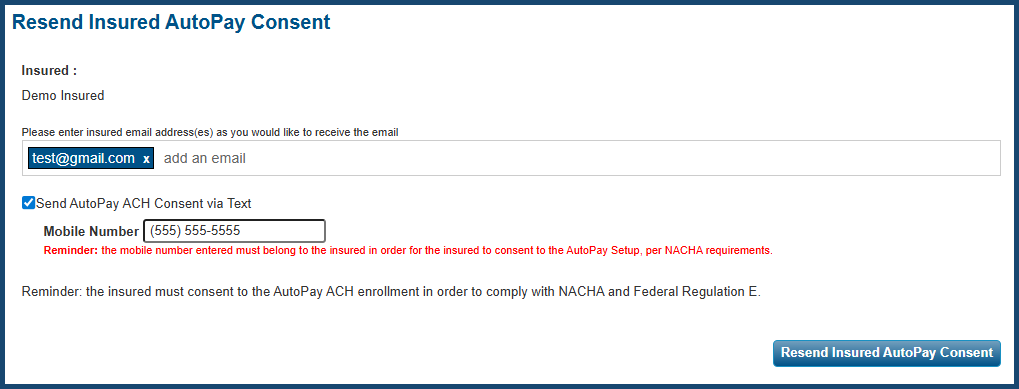
Resend Insured AutoPay Consent Screen
- Verify the current email addresses for accuracy.
- Add or remove email addresses from the list.
- The consent can be sent via text message in addition to email if selected.
- Once complete, hit Resend Insured AutoPay Consent.
The information contained herein is confidential an proprietary. Recipients will respect the confidentiality of this material and not disclose to any third party any of the contents of this document without first obtaining written approval from IPFS. Copyright © 2023 IPFS Corporation. All rights reserved. 02/11/26