ipfs.com| AutoPay
Related Articles |
| Insured Alert Preferences |
| IPFS TotalPay Insured Experience |
| Insured Features FAQ |
eSign and AutoPay for Insureds
AutoPay is available to your insureds during the eSign process.
Click to download  Insured Guide - eSign and DP - ACH AutoPay.pdf
Click to download Insured Guide - eSign and DP - CC AutoPay.pdf
If you as the agent initate the AutoPay enrollment on behalf of the insured, the insured will receive an email from IPFS with the AutoPay consent form.
Click to download Insured Guide - Consent to AutoPay.pdf
- Enter the Signature, Title and Phone.
- Opt into eForms if this service has not been used in the past.
- After selecting the down payment method, Credit Card (CC) or ACH, the AutoPay enrollment options are displayed.
- Enroll in AutoPay using the same payment method.
- Agree to the terms of the PFA, electronic signature, eForms and the Down Payment Agreement/AutoPay Agreement.
- When paying via ACH select Enter Payment Information.
- The system prompts you to use the same account for AutoPay.
- If YES is selected, the AutoPay Account entry will be removed.
- No allows you to enter a different bank account for AutoPay.
- Choose Submit Down Payment and Setup AutoPay.
- Please note transactions will appear as IPFS Corporation on the bank statement.
- The system prompts you to use the same account for AutoPay.
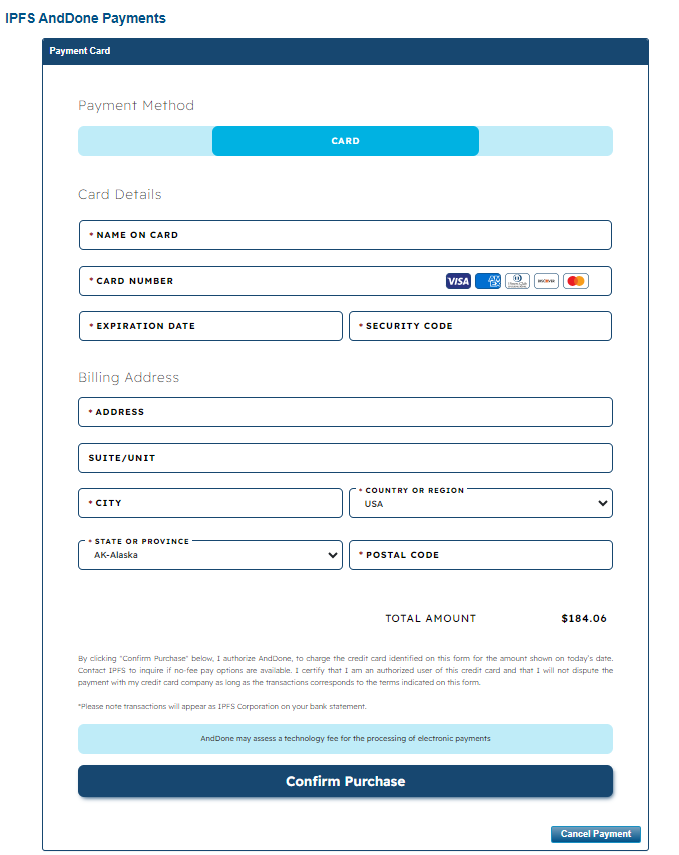
- When paying via Credit Card (CC), you can elect AutoPay-Credit Card.
- Enter the credit card details [Name, Card, Exp Month/Year, Card CVV/CVC, Billing Address and email address for receipt].
- Authorize the total and Confirm Purchase.
-
Please note transactions will appear as “IPFS Ins Pmt” on your credit card statement and the technology fee will be appear as PNP-ANDDONE TECH FEE.
-
-
If not selecting AutoPay choose No, I would not like to enroll in AutoPay.
- For ACH, select Enter Payment Information and enter ACH down payment details and choose Submit Down Payment.
- For CC, enter the credit card details and billing address. Choose Confirm Purchase.
The information contained herein is confidential an proprietary. Recipients will respect the confidentiality of this material and not disclose to any third party any of the contents of this document without first obtaining written approval from IPFS. Copyright © 2026 IPFS Corporation. All rights reserved. 09/11/26