ipfs.com| Pay in Full Only Quote
Related Articles |
| IPFS TotalPay Start Guide |
| IPFS TotalPay eSign |
| IPFS TotalPay Insured Selects Payment |
| Payment FAQ |
A pay in full quote removes the policy details section and allows for a simplified quoting experience.
- Enter the Agent and Insured Details as you normally would.
- In the Program section, check Pay in full only and the policy details collapse.
- Enter the premium amount, policy number and a description for your insured.
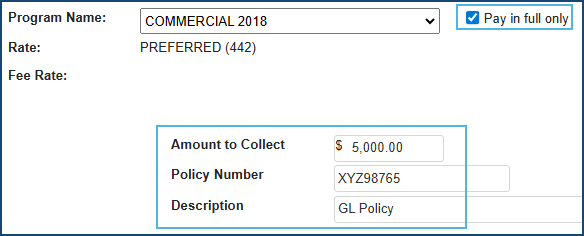
- Payment options are presented on the quote screen defaulted to Insured Selects the Payment type.
- Elect to pay in full or allow the insured to pay in full electronically.
- If paying in full, select the payment type and enter the ACH or CC details then select Submit.
- If the insured is paying, email the insured or have IPFS email the insured and select Submit.
- IPFS will send an email to the insured to make the payment in full and the status will update.
- When you email the insured, the payment link is displayed and you can have a copy sent to you.
- Elect to pay in full or allow the insured to pay in full electronically.
The information contained herein is confidential an proprietary. Recipients will respect the confidentiality of this material and not disclose to any third party any of the contents of this document without first obtaining written approval from IPFS. Copyright © 2026 IPFS Corporation. All rights reserved. 09/11/26