ipfs.com| Hold an Account
Related Articles |
| Account Status Defined |
| Search for Accounts |
| Account Detail and Management |
| Account FAQ's |
When a payment is anticipated, you can place a delinquent account on "hold". This will prevent cancellation and allow time for the payment to be received and processed by IPFS.  Provider Holds cancellation .pdf
|
|
The account must be in Delinquent Status
- From the Account Details choose the "Hold Button".
- Choose the # of days from the drop down, enter comments and choose Submit
|
HOLD SCREEN 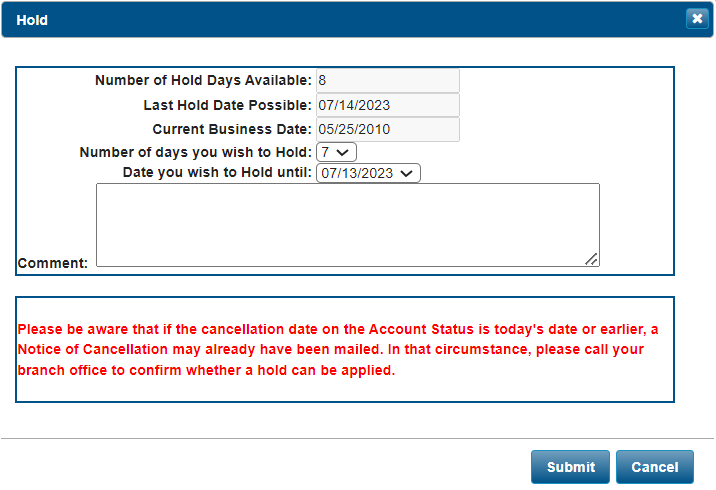
|
- The Hold button is not available IF:
- Status is Current, Grace, Pending, Canceled or Policy Cancellation.
- Current date is equal to the next payment due date.
- Current date is > 30 days past the payment due date.
- Maximum # of Hold Days
- Capped at 9 business days (excluding weekends/holidays).
- Cannot hold past the next payment due date + 30 days.
- Can be held again when the 9 days expire, if it does not exceed the next payment due + 30 days.
The information contained herein is confidential an proprietary. Recipients will respect the confidentiality of this material and not disclose to any third party any of the contents of this document without first obtaining written approval from IPFS. Copyright © 2026 IPFS Corporation. All rights reserved. 09/11/26